TMRWTOOLS
AboutBlog
Submit Tool
TMRW TOOLS
GuideBlogSubmit Tool
  • 01Home
  • 02Guide
  • 03Blog
  • Submit Tool
HOME/Image Tools/Recraft
BACK TO TOOLS
HOME/Image Tools/Recraft

RecraftReview: images as editable SVG files

Recraft screenshot

RecraftReview: images as editable SVG files

Image ToolsGenerative Art
Freemium

Recraft makes AI images you can export as SVG vector files. That means you can scale them to any size, edit them in Figma or Illustrator, and drop them straight into a website. Very few image generators can do that. Its regular images are strong too: on Hugging Face's Text-to-Image Arena, it beat Midjourney and DALL-E 3 in 72% of comparisons. V4 Styles, released in August 2026, keeps the style consistent across a batch. That matters if you're making a set of icons, social cards or brand graphics that need to look like they belong together. The free plan includes every model: Standard, Pro, Vector and Vector Pro. The results look like a designer planned them, not like stock images.

Image ToolsGenerative Art
Freemium

Keywords

svg, vector, design, logo, icon, figma, illustrator, image generation
  • Native SVG generation: The only AI model that produces real vector paths — scalable, editable, print-ready in CMYK.
  • V4 Styles: Style-consistent generation across batches for branded asset sets.
  • Multiple output modes: Standard (1024×1024), Pro (2048×2048), Vector, and Vector Pro — all available on the free plan.
  • Design-first composition: Balanced color, intentional layouts, and refined detail that reads as designed rather than generated.

TMRW VERDICT

The image generator designers actually export from

by TMRW Team·Oct 4, 2026

Recraft does something very few image generators even try: real vector output. Most give you a flat image file. Recraft gives you something you can open in Illustrator, scale up to billboard size and send to print. That alone earns it a place here.

Its regular images are strong too. V4.1 ranks ahead of Midjourney and DALL-E 3 on Hugging Face's Text-to-Image Arena. Other models are catching up, with FLUX and Imagen 3 both improving, so the vector output is what really keeps Recraft different.

Best for freelancers and small businesses making their own logos, icons and brand graphics. If you need photorealistic images, or you never work with vectors, Midjourney or Ideogram will serve you better.

More Tools Like This

Ideogram

Ideogram

Image ToolsMarketing

Ideogram is an AI image generator that gets the words right. Ask for a poster that says "Grand Opening" and you get those words, spelled correctly, in the image. Plenty of other generators still mangle letters often enough that you end up fixing them in Photoshop. Ideogram 3.0 also handles Korean and Japanese text better than most. That makes it the obvious pick for YouTube thumbnails, social cards, flyers and anything else where the text has to be readable. The free plan gives you 10 prompts a day. Its lead is shrinking, though. FLUX, Recraft and Midjourney v7 have all got better at text. Ideogram is still the more reliable choice, just not by the margin it used to have.

View Details
UseIt Studio

UseIt Studio

Generative Art

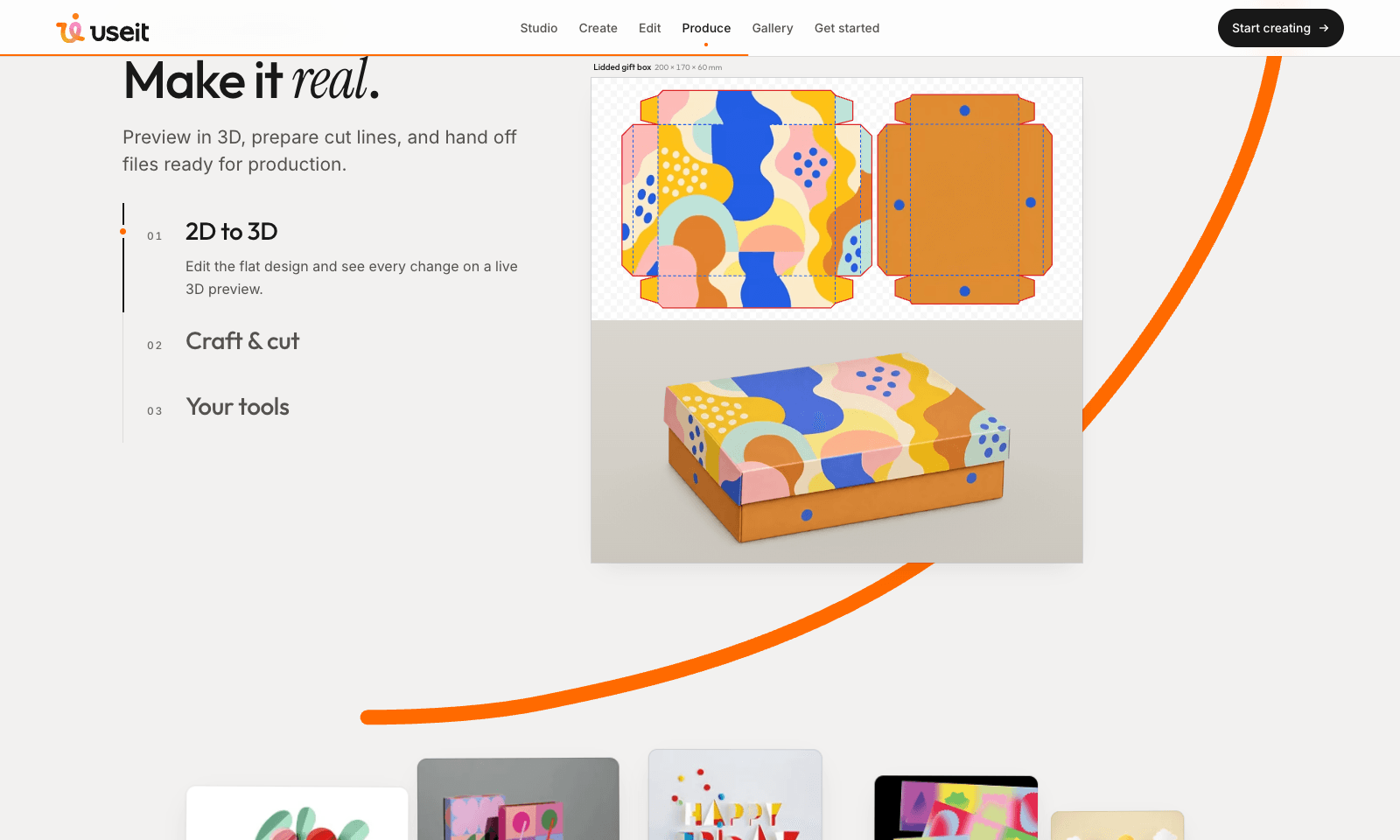
UseIt Studio designs things you can hold: pins, stickers, cards, invitations, mugs, menus, and gift boxes. Describe the object, and when a detail is off, select that part and say what to change. Type "Crop out the yellow cube and make it red" and only the cube turns red while the rest of the artwork stays put. One look can also carry across a whole set, from cups and tote bags to packaging. What you get back is ready for production. A lidded gift box comes as a flat template you edit next to a live 3D preview, sized at 200 × 170 × 60 mm. For acrylic standees and stickers, UseIt traces the cut line around your art and adds the white-ink layer printers ask for, then exports a print PDF or hands the file over to Illustrator. It runs in your browser, and there's a Windows app as well. The homepage doesn't list a monthly price. You spend credits inside the studio.

View Details
Riverside Agents

Riverside Agents

Video ToolsGenerative Video

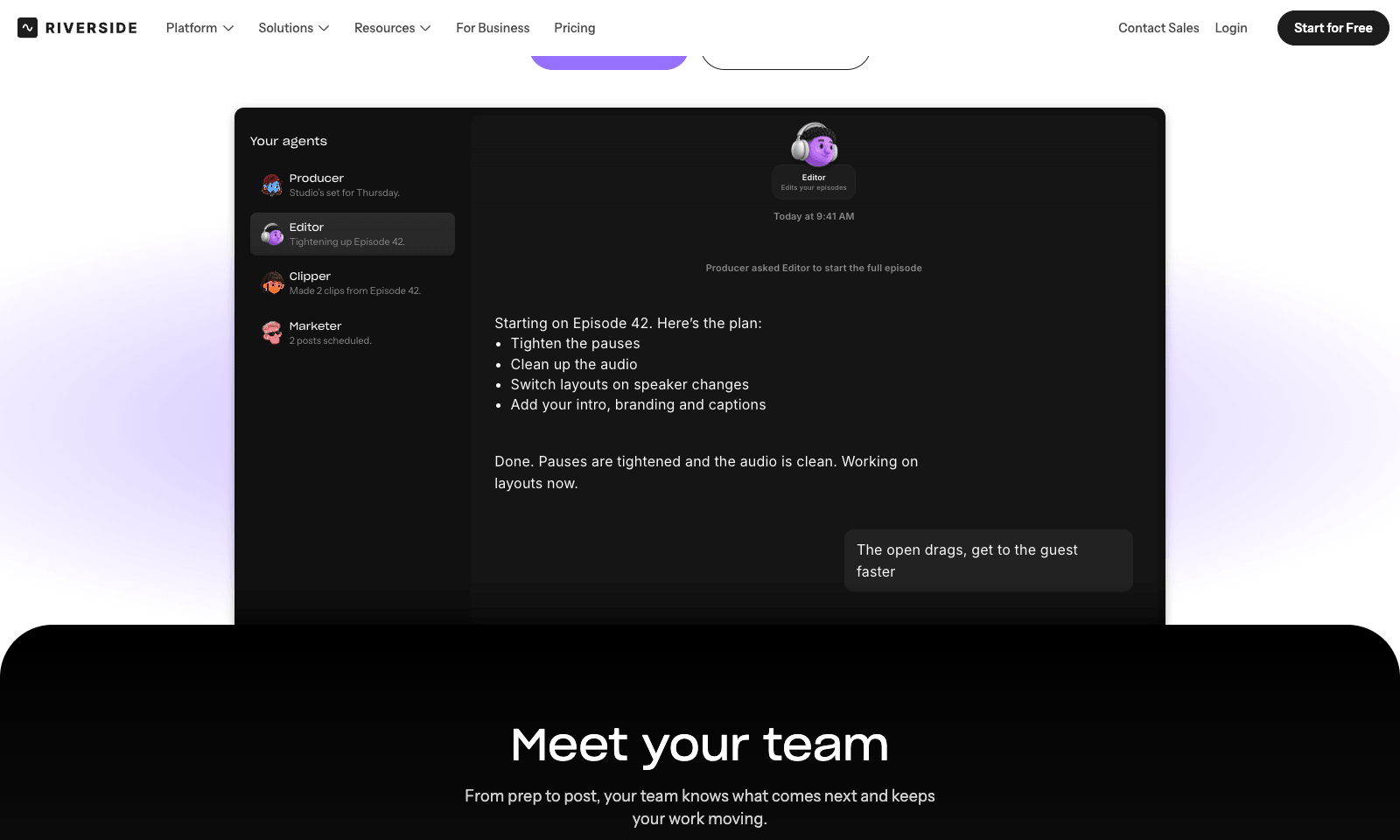
Riverside Agents adds four AI helpers to Riverside's recording studio. Producer preps the session, down to suggesting eight questions worth asking your guest. Editor turns the raw recording into an episode: it tightens pacing, cleans up audio, cuts filler words, switches layouts, and adds captions and branding. Clipper finds the moments worth posting and cuts them. Marketer writes the captions and the newsletter and schedules the posts. You decide how much to hand over. Any step can stay manual, and nothing is published until you approve it. The agents also work on old recordings, so a back catalog can be clipped and promoted again. For businesses, the same crew sets up a webinar's registration page, invites, and run of show. Agents ship on every plan, on web and mobile. Pro is $29 a month, or $24 billed yearly, with 2,000 AI credits. Extras like AI B-roll spend credits when an agent uses them.

View Details
ReSO AI

ReSO AI

Business Tools

ReSO tracks whether ChatGPT, Perplexity, and Google's AI Overviews mention your company when buyers ask about your category, then tells you what to change. It starts with about 75 buyer-style questions across discovery, comparison, and "alternatives to" searches, and shows where you're mentioned, cited, or recommended, and where a competitor gets the nod instead. Then it works like a small agency. A technical audit checks whether AI systems can read your site properly. Each week you get a prioritized list of roughly eight on-site fixes, plus two drafted articles aimed at the questions you're losing. You still publish them and make the changes yourself, and ReSO re-checks the following week. The free AI visibility audit needs no card. Paid plans aren't listed on the homepage; launch-week signups got a month free on access the makers valued at $599.

View Details
TMRW TOOLS

AI tools we'd actually recommend.

A short list of AI tools for everyday work. We try each one before we write about it.

Navigate

  • Home
  • AI Guide
  • Blog
  • About
  • Contact

Tools

  • Browse Tools
  • Meeting notes
  • Voice writing
  • Spreadsheets
  • Short video
  • Submit Tool
  • Categories
  • Partner Program

Follow us

Legal

Privacy PolicyTerms of ServiceImprint
TMRW TOOLS

AI tools we'd actually recommend.

A short list of AI tools for everyday work. We try each one before we write about it.

Follow us

Navigate

  • Home
  • AI Guide
  • Blog
  • About
  • Contact

Tools

  • Browse Tools
  • Meeting notes
  • Voice writing
  • Spreadsheets
  • Short video
  • Submit Tool
  • Categories
  • Partner Program

Legal

  • Privacy Policy
  • Terms of Service
  • Imprint
TMRW TOOLS

AI tools we'd actually recommend.

A short list of AI tools for everyday work. We try each one before we write about it.

Navigate

  • Home
  • AI Guide
  • Blog
  • About
  • Contact

Tools

  • Browse Tools
  • Meeting notes
  • Voice writing
  • Spreadsheets
  • Short video
  • Submit Tool
  • Categories
  • Partner Program

Follow us

Legal

  • Privacy Policy
  • Terms of Service
  • Imprint
© 2026 TMRW TOOLS. All rights reserved.