UseIt StudioReview: a box you can print from a sentence
Freemium
UseIt Studio designs things you can hold: pins, stickers, cards, invitations, mugs, menus, and gift boxes. Describe the object, and when a detail is off, select that part and say what to change. Type "Crop out the yellow cube and make it red" and only the cube turns red while the rest of the artwork stays put. One look can also carry across a whole set, from cups and tote bags to packaging.
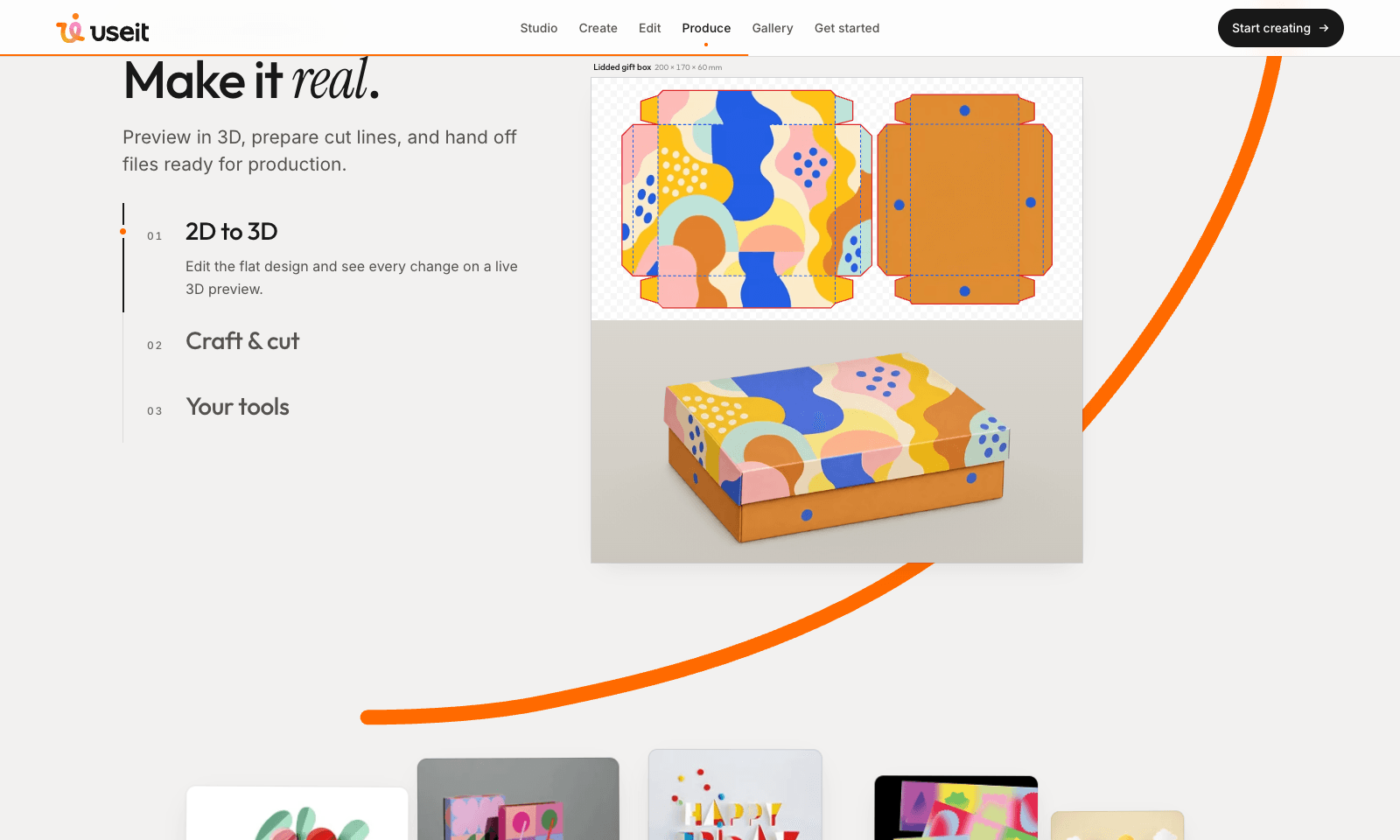
What you get back is ready for production. A lidded gift box comes as a flat template you edit next to a live 3D preview, sized at 200 × 170 × 60 mm. For acrylic standees and stickers, UseIt traces the cut line around your art and adds the white-ink layer printers ask for, then exports a print PDF or hands the file over to Illustrator. It runs in your browser, and there's a Windows app as well. The homepage doesn't list a monthly price. You spend credits inside the studio.
Freemium
Keywords
print, packaging, dieline, stickers, gift box
- Point and fix: Select a detail, describe the change, and the rest of the design stays as it is.
- Flat and 3D side by side: Edit the box template and watch the folded box update.
- Cut lines and white ink: Traced for you on acrylic, stickers, and other shaped pieces.
- Print-ready export: A PDF for the print shop, or keep going in Illustrator.
- A remixable gallery: Publish a design and others can swap in their own words and photos.
TMRW VERDICT
The AI design tool that knows what a printer needs
by TMRW Team·Oct 25, 2026
Most AI image tools stop at a nice picture. That's fine for Instagram and useless when a print shop asks for a cut file. UseIt starts where they stop. You get a box template that actually folds, a 3D preview that shows whether the logo lands on the lid, and a cut line traced around your standee so the acrylic comes out the right shape. If you sell on Etsy, run a small brand, or you're making your own wedding stationery, that's the fiddly, expensive step it takes off your plate.
Ideogram and Recraft still make better standalone images, so keep them for posters and social posts. Reach for UseIt when the result ends up on a cutting table.
Two catches. The desktop app is Windows only, so Mac users stay in the browser. And the homepage never tells you what anything costs, so check the credit price inside the studio before you sink an afternoon into it. Then try it on one real order. If the box closes and the cut line hugs the art, you've found the missing step between a chat image and Illustrator.