TMRWTOOLS
AboutBlog
Submit Tool
TMRW TOOLS
GuideBlogSubmit Tool
  • 01Home
  • 02Guide
  • 03Blog
  • Submit Tool
HOME/Productivity/Savor
BACK TO TOOLS
HOME/Productivity/Savor

SavorReview: half-formed plans turned into next steps
Savor screenshot

SavorReview: half-formed plans turned into next steps

ProductivitySelf-Improvement
Free

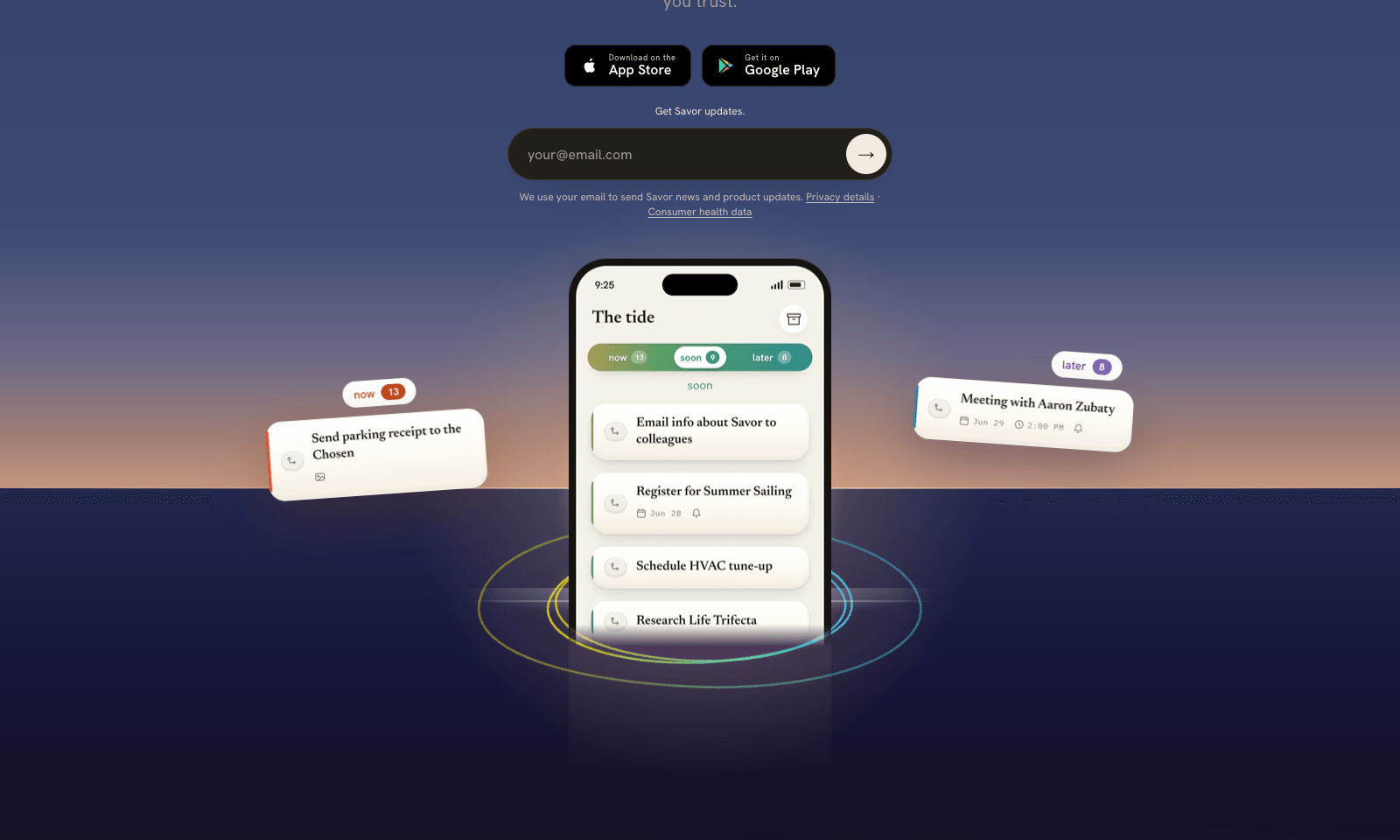
Savor is a free phone app for the things too small or too vague for a to-do list: call the dentist, book that trip, deal with the parking fine. Say it, type it, or snap a photo of the letter or flyer, and Savor turns it into a card. Cards sit in three lanes, Now, Soon, and Later, and come back with a reminder when their date gets close.

The AI part is Take Action, still in beta. Open a card and it helps you work out the next step: compare options, build a list, look up public information, or draft the message you've been putting off. You can also hand a card to someone else who uses Savor; once they accept, it's theirs, reminders included. Photos of bills and letters are read automatically, and Siri can add cards hands-free. It's free on iPhone and Android while the company has paid plans on hold.

ProductivitySelf-Improvement
Free

Keywords

reminders, life admin, to-do, shared lists, voice capture
  • Capture any way: Voice, text, or a photo of a bill, letter, or flyer.
  • Three lanes: Now, Soon, and Later, which you can redefine.
  • Take Action (beta): Options, plans, and drafts for a single card.
  • Hand-offs: Pass a card to a partner or colleague, reminders and all.
  • Free: No paid plan while monetization is paused.

TMRW VERDICT

A to-do app for the stuff you keep not doing

by TMRW Team·Nov 2, 2026

Most to-do apps fail at the item that isn't a task yet. "Sort out the car insurance" sits there for weeks because the first step is unclear. Take Action goes straight at that, turning the vague card into options and a first draft. Photo capture is the other good idea: a letter from the city becomes a reminder in one shot.

It's most useful for busy households and anyone whose life admin piles up, and hand-offs make it a decent shared list for couples. For real projects with deadlines and subtasks, Todoist or Apple Reminders are still the better tools.

It's free right now because the company paused charging, which tells you the business model isn't settled. Data is encrypted at rest but not end to end, so keep the medical letters out of it. For everything else, it costs nothing to find out whether it finally gets you to call the dentist.

More Tools Like This

Hola AI Voicemail

Hola AI Voicemail

Productivity

Hola AI answers the calls you miss. When you're busy, don't pick up, or the phone is off, the call forwards to an AI assistant that talks to the caller, finds out what they want, and sends you a summary by push, text, or email. Calls land in an inbox tagged Work, Family, Appointment, or Delivery, spam goes to its own tab, and you can call back or mark a call important with one tap. It uses your existing number through call forwarding, so there's no new SIM and no second number. You can choose from seven voices and personalities and greet saved contacts by name. Every call keeps a recording and a searchable transcript, and you can delete a single call or all of your data. It's on iPhone and Android, at $4.99 a month for the first six months and $9.99 after that, with a three-day free trial.

View Details
Gauth

Gauth

ResearchSelf-Improvement

Gauth is an AI study app for students. It solves problems step by step, tutors you through concepts you don't understand, and builds full lessons on any topic you choose. Those lessons play out on a single endless whiteboard. Chapters open side by side while an AI voice narrates and the board notes write themselves in sync. You can zoom from the full concept map down to a single formula. When you pause to ask the tutor something, the answer appears on the board right under that step and stays there.

View Details
AskDeck

AskDeck

ProductivityBusiness Tools

AskDeck makes a PowerPoint the way you'd ask a colleague for one. Text it, leave a voicemail, call, fill in a form, or email the agent (he's called Eric) with your memo attached: "Board update Thursday, 12 slides, from this memo, in our template." Eric works out the story, builds the deck in your own master template, writes speaker notes and sends back a free watermarked preview. Want changes? Ask in plain English. What you get is a real .pptx you can edit, so there's nothing to export from some web format. It can also make a narrated video with captions from the same slides, which means the two always match. You can upload an old deck to reformat it or turn it into a video. One finished deck is $29. Pro is $99 a month for three decks plus your brand kit, and Teams is $299 a month for five people.

View Details
Scape

Scape

Productivity

Scape is a desktop email app that reads ahead. Before you open a thread, it has picked out the few emails that need you, drafted the replies, and pulled in what it needs from your calendar, attachments, and past meetings. You review, edit, and send. The rest of the inbox gets labels that sync back to Gmail, so nothing is lost if you open Gmail later. The meeting part is what sets it apart. Scape spots your next Zoom, Meet, Teams, or FaceTime call and records it on your Mac with one click, no bot in the call, transcribing in 99 languages. When the call ends, the follow-up email is already drafted from what was said. It's a preview release from a Stockholm team backed by Y Combinator. Free covers unlimited inboxes and recordings. Plus is $20 a month for automations and higher AI limits; Max is $100.

View Details
TMRW TOOLS

AI tools we'd actually recommend.

A short list of AI tools for everyday work. We try each one before we write about it.

Navigate

  • Home
  • AI Guide
  • Blog
  • About
  • Contact

Tools

  • Browse Tools
  • Meeting notes
  • Voice writing
  • Spreadsheets
  • Short video
  • Submit Tool
  • Categories
  • Partner Program

Follow us

Legal

Privacy PolicyTerms of ServiceImprint
TMRW TOOLS

AI tools we'd actually recommend.

A short list of AI tools for everyday work. We try each one before we write about it.

Follow us

Navigate

  • Home
  • AI Guide
  • Blog
  • About
  • Contact

Tools

  • Browse Tools
  • Meeting notes
  • Voice writing
  • Spreadsheets
  • Short video
  • Submit Tool
  • Categories
  • Partner Program

Legal

  • Privacy Policy
  • Terms of Service
  • Imprint
TMRW TOOLS

AI tools we'd actually recommend.

A short list of AI tools for everyday work. We try each one before we write about it.

Navigate

  • Home
  • AI Guide
  • Blog
  • About
  • Contact

Tools

  • Browse Tools
  • Meeting notes
  • Voice writing
  • Spreadsheets
  • Short video
  • Submit Tool
  • Categories
  • Partner Program

Follow us

Legal

  • Privacy Policy
  • Terms of Service
  • Imprint
© 2026 TMRW TOOLS. All rights reserved.