TMRWTOOLS
AboutBlog
Submit Tool
TMRW TOOLS
GuideBlogSubmit Tool
  • 01Home
  • 02Guide
  • 03Blog
  • Submit Tool
HOME/Productivity/Scape
BACK TO TOOLS
HOME/Productivity/Scape

ScapeReview: an inbox that drafts the reply before you open it
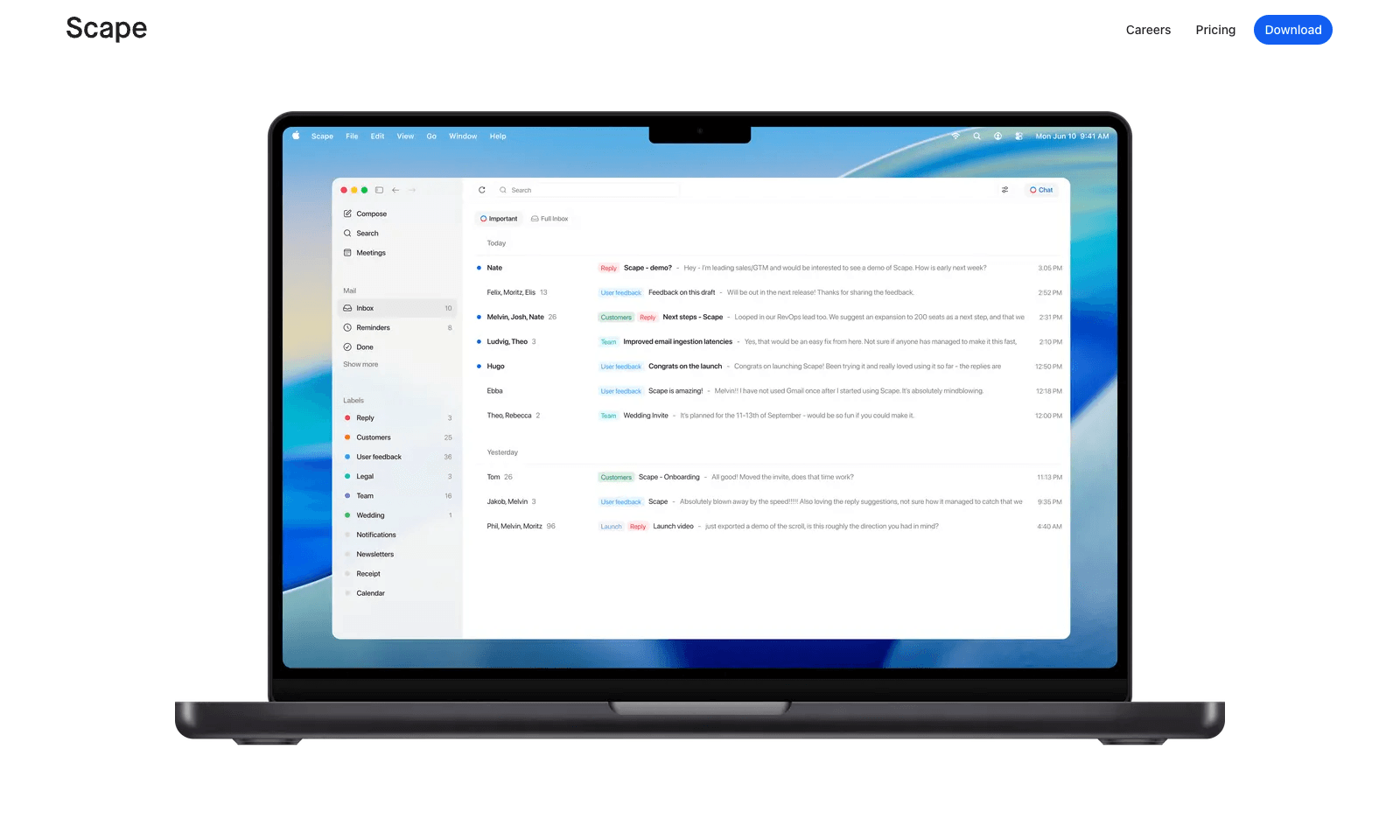
Scape screenshot

ScapeReview: an inbox that drafts the reply before you open it

Productivity
Freemium

Scape is a desktop email app that reads ahead. Before you open a thread, it has picked out the few emails that need you, drafted the replies, and pulled in what it needs from your calendar, attachments, and past meetings. You review, edit, and send. The rest of the inbox gets labels that sync back to Gmail, so nothing is lost if you open Gmail later.

The meeting part is what sets it apart. Scape spots your next Zoom, Meet, Teams, or FaceTime call and records it on your Mac with one click, no bot in the call, transcribing in 99 languages. When the call ends, the follow-up email is already drafted from what was said. It's a preview release from a Stockholm team backed by Y Combinator. Free covers unlimited inboxes and recordings. Plus is $20 a month for automations and higher AI limits; Max is $100.

Productivity
Freemium

Keywords

email client, reply drafts, meeting recording, follow-ups, inbox
  • A needs-you view: Only the emails that actually need an answer.
  • Drafts with context: Replies draw on your calendar, attachments, and meeting transcripts.
  • Bot-free recording: One click records the call locally on your Mac.
  • Follow-ups already written: The recap email is drafted when the meeting ends.
  • Gmail-synced labels: Scape's sorting shows up in Gmail too.

TMRW VERDICT

The email app that remembers what you said on the call

by TMRW Team·Nov 2, 2026

Plenty of tools write email replies. Scape's edge is that it was in the meeting. Recording the call on your Mac and drafting the follow-up from what was actually said closes the most annoying gap in office work: the promise made on Tuesday's call that nobody emails about until Friday. For salespeople, consultants, and founders who live between the calendar and the inbox, that's a real job.

Shortwave is still the better pick if you want AI on top of Gmail without changing apps. Scape asks you to move into a new desktop client, and it's labeled a preview, so expect rough edges. Granola is the more polished note-taker, but it lives outside your inbox.

Skip it if your email is mostly newsletters and receipts, or if your company won't let a startup read the inbox. Scape says it doesn't train on your mail and lists SOC 2 and GDPR compliance, but that's still a lot of access. If your day is calls and follow-ups, the free plan is enough to find out.

More Tools Like This

Savor

Savor

ProductivitySelf-Improvement

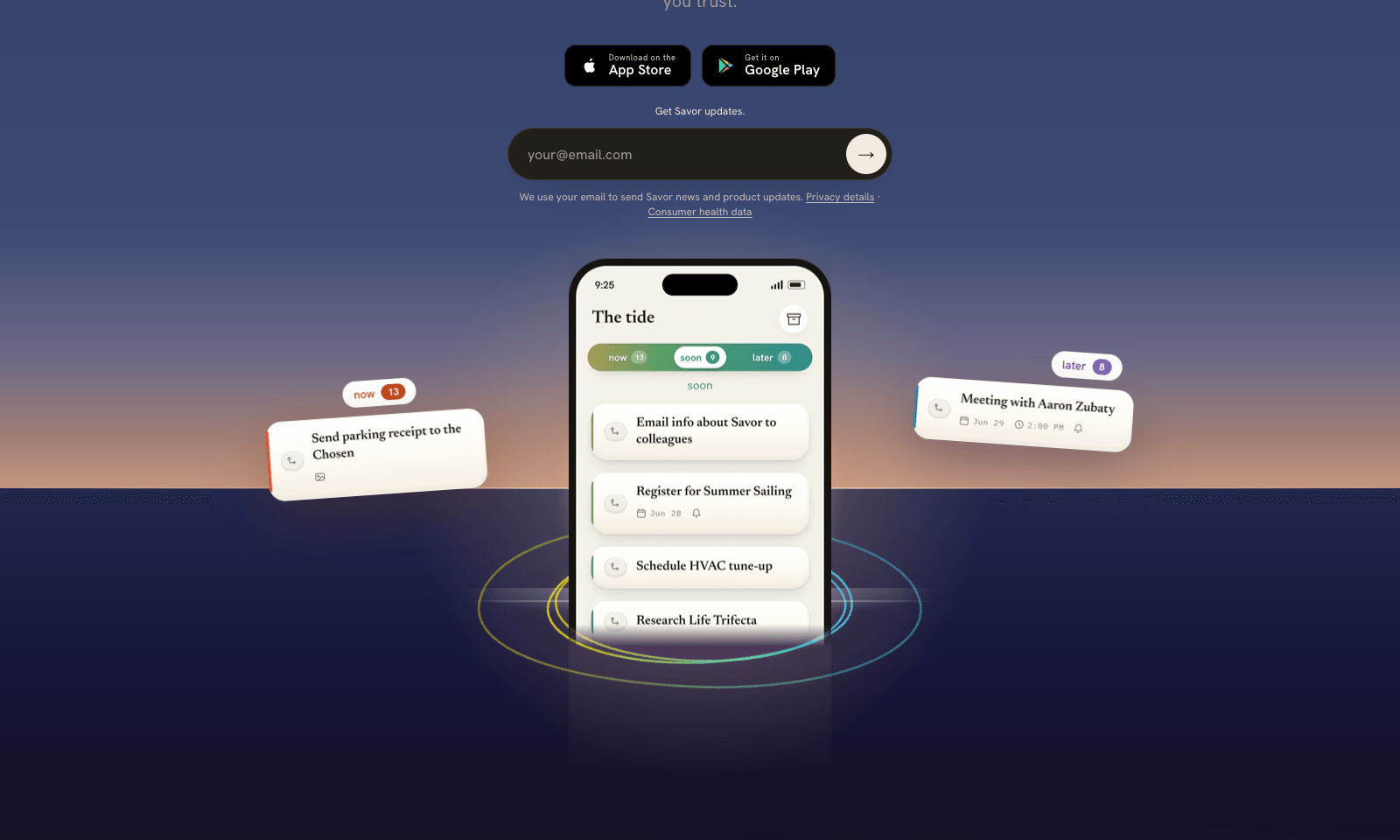
Savor is a free phone app for the things too small or too vague for a to-do list: call the dentist, book that trip, deal with the parking fine. Say it, type it, or snap a photo of the letter or flyer, and Savor turns it into a card. Cards sit in three lanes, Now, Soon, and Later, and come back with a reminder when their date gets close. The AI part is Take Action, still in beta. Open a card and it helps you work out the next step: compare options, build a list, look up public information, or draft the message you've been putting off. You can also hand a card to someone else who uses Savor; once they accept, it's theirs, reminders included. Photos of bills and letters are read automatically, and Siri can add cards hands-free. It's free on iPhone and Android while the company has paid plans on hold.

View Details
Hark

Hark

AI AgentsProductivity

Hark is a personal AI assistant that handles everyday errands for you: booking travel, ordering food, paying bills, scheduling appointments and doing research. It's for busy people who want to hand those chores to an assistant and only step in to approve. You connect your email, calendar and online accounts, and the home screen fills with action cards, such as a bill to pay, an appointment to book or an expense to approve, each of which you can approve with one tap. For jobs that need the web, a cloud agent called Handoff opens a browser, does the work and shows you each step as it goes. Payments still need your confirmation, and saved logins and payment details are end-to-end encrypted.

View Details
Loqua

Loqua

ProductivityText Tools

Loqua is a Mac and Windows app that types what you say into whatever field you have open. Press one shortcut and talk in Slack, Mail, Notion or your browser. Clean text appears at the cursor with the filler removed, and it adds lists and headings based on how you spoke. You finish the email or Slack reply right where you are, with nothing to copy over from a notes app. The same shortcut can rewrite selected text by voice, translate into more than 100 languages as you speak, or take a screenshot of a chart or error and answer questions about it. It needs the internet to process speech, but your history stays on your device. After a 14-day Pro trial, the free plan gives you 5,000 words and 10 screenshot questions a week. It doesn't work offline and there's no phone app yet.

View Details
AskDeck

AskDeck

ProductivityBusiness Tools

AskDeck makes a PowerPoint the way you'd ask a colleague for one. Text it, leave a voicemail, call, fill in a form, or email the agent (he's called Eric) with your memo attached: "Board update Thursday, 12 slides, from this memo, in our template." Eric works out the story, builds the deck in your own master template, writes speaker notes and sends back a free watermarked preview. Want changes? Ask in plain English. What you get is a real .pptx you can edit, so there's nothing to export from some web format. It can also make a narrated video with captions from the same slides, which means the two always match. You can upload an old deck to reformat it or turn it into a video. One finished deck is $29. Pro is $99 a month for three decks plus your brand kit, and Teams is $299 a month for five people.

View Details
TMRW TOOLS

AI tools we'd actually recommend.

A short list of AI tools for everyday work. We try each one before we write about it.

Navigate

  • Home
  • AI Guide
  • Blog
  • About
  • Contact

Tools

  • Browse Tools
  • Meeting notes
  • Voice writing
  • Spreadsheets
  • Short video
  • Submit Tool
  • Categories
  • Partner Program

Follow us

Legal

Privacy PolicyTerms of ServiceImprint
TMRW TOOLS

AI tools we'd actually recommend.

A short list of AI tools for everyday work. We try each one before we write about it.

Follow us

Navigate

  • Home
  • AI Guide
  • Blog
  • About
  • Contact

Tools

  • Browse Tools
  • Meeting notes
  • Voice writing
  • Spreadsheets
  • Short video
  • Submit Tool
  • Categories
  • Partner Program

Legal

  • Privacy Policy
  • Terms of Service
  • Imprint
TMRW TOOLS

AI tools we'd actually recommend.

A short list of AI tools for everyday work. We try each one before we write about it.

Navigate

  • Home
  • AI Guide
  • Blog
  • About
  • Contact

Tools

  • Browse Tools
  • Meeting notes
  • Voice writing
  • Spreadsheets
  • Short video
  • Submit Tool
  • Categories
  • Partner Program

Follow us

Legal

  • Privacy Policy
  • Terms of Service
  • Imprint
© 2026 TMRW TOOLS. All rights reserved.