TMRWTOOLS
AboutBlog
Submit Tool
TMRW TOOLS
GuideBlogSubmit Tool
  • 01Home
  • 02Guide
  • 03Blog
  • Submit Tool
HOME/Video Tools/Viggle
BACK TO TOOLS
HOME/Video Tools/Viggle

ViggleReview: a still character, set in motion

Viggle screenshot

ViggleReview: a still character, set in motion

Video ToolsGenerative Video
Free

Viggle takes a still image of a character and makes it move. Give it a picture plus a reference video or a text prompt, and its JST-1 model maps realistic movement onto the character: walking, dancing, gesturing. The motion has weight to it, so the character looks like it's standing on the ground instead of floating. It started out on Discord and now has web and mobile apps, which makes it much easier to pick up. The free plan gives you five videos a day. The limits are real. Clips run under 15 seconds, there's no audio, and beyond the preset animation styles you can't customize much. It's fun to play with and good for quick social clips and memes. Don't expect an animation studio.

Video ToolsGenerative Video
Free

Keywords

character animation, motion capture, ai animation, meme, social content, physics-based
  • JST-1 foundation model: Physics-based character motion that feels grounded, not floating.
  • Reference video or text prompt: Animate from an existing video's motion or describe the movement you want.
  • Free tier: 5 videos per day, no subscription required.
  • 4M+ community: Active creator community with shared templates and motion references.

TMRW VERDICT

The tool behind half the character memes you've seen this year

by TMRW Team·Oct 4, 2026

You've probably seen Viggle's work without knowing it. Those memes where a still image suddenly walks, dances or does something absurd are often made with Viggle. The physics-based motion is what makes it work. Characters respond to gravity and the ground in a way that sells the animation.

It's obviously made for social content, memes and short videos where a character doing something unexpected is the hook. The limits are just as obvious: clips under 15 seconds, no audio and very little fine control. This isn't After Effects. It's a quick clip generator for people who want entertaining content without learning animation.

Best for content creators, social media managers and anyone making short, entertaining videos. If you need professional animation with precise control, synced audio or clips longer than 15 seconds, look elsewhere.

More Tools Like This

PixVerse R2

PixVerse R2

Video ToolsEntertainment & Fun

PixVerse R2 lets you step into an AI-generated world and change it while it plays, instead of waiting for a finished clip to download. You pick from a gallery of live scenes: a road through a wheat field, a figure on a ship's rigging, a winter palace, a ski run. Once you're inside, text, an image, audio or a movement changes what happens next, and the scene remembers what came before. Kling renders a video and stops. R2 lets you steer. In explore mode you move with WASD, and a new prompt changes the scene instead of starting a new file. The worlds are free to try at world.pixverse.video. It's not a game engine, though, and you won't get an MP4 for an ad out of it. If you need a file you can post, use Kling.

View Details
Riverside Agents

Riverside Agents

Video ToolsGenerative Video

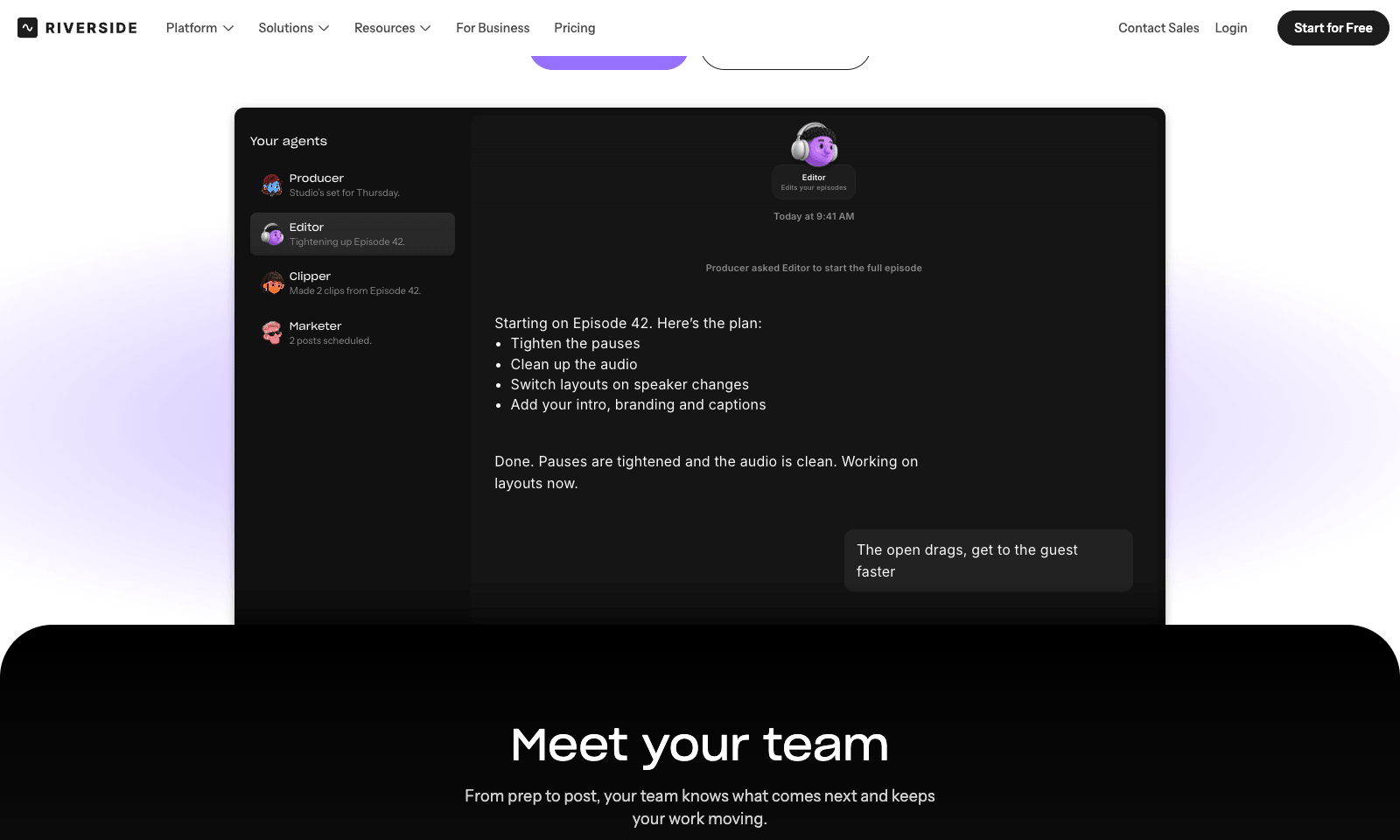
Riverside Agents adds four AI helpers to Riverside's recording studio. Producer preps the session, down to suggesting eight questions worth asking your guest. Editor turns the raw recording into an episode: it tightens pacing, cleans up audio, cuts filler words, switches layouts, and adds captions and branding. Clipper finds the moments worth posting and cuts them. Marketer writes the captions and the newsletter and schedules the posts. You decide how much to hand over. Any step can stay manual, and nothing is published until you approve it. The agents also work on old recordings, so a back catalog can be clipped and promoted again. For businesses, the same crew sets up a webinar's registration page, invites, and run of show. Agents ship on every plan, on web and mobile. Pro is $29 a month, or $24 billed yearly, with 2,000 AI credits. Extras like AI B-roll spend credits when an agent uses them.

View Details
Clipto

Clipto

Video Tools

Clipto searches the videos, photos, recordings, voice memos and documents already on your computer. It indexes them on your machine, so you can find a moment by what's on screen or what someone said instead of hunting for a filename. Search for "the shot where the car goes around the bend" and you get that frame, with a timestamp and a link straight into the file, ready to cut. Other tools can use the library too. Claude, ChatGPT and Cursor can search it through an MCP server, and there are plugins for Premiere Pro and DaVinci Resolve. You choose which folders are visible. An agent only gets back the results it asked for, and your footage stays on your computer unless you change that.

View Details
Hob

Hob

Productivity

Hob is a free desktop assistant that runs entirely on your own computer. Install it and it picks an open model that fits your machine, such as Google's Gemma or OpenAI's gpt-oss, then downloads and sets it up. After that you use it like ChatGPT, with one difference: your chats and files never leave the laptop. No account, no subscription, no telemetry, and it keeps working offline. It does real file work. Point it at a folder and it can read a sales spreadsheet and chart revenue by region, fill out a PDF form, or edit a document. It asks before every change and lets you undo one it got wrong. On Mac, Mail and Calendar are built in. It needs 8 GB of RAM at minimum, 16 GB for everyday work, and 10 to 25 GB of disk. It runs on Apple silicon Macs, Windows, and Linux, and it's MIT-licensed by Frigade.

View Details
TMRW TOOLS

AI tools we'd actually recommend.

A short list of AI tools for everyday work. We try each one before we write about it.

Navigate

  • Home
  • AI Guide
  • Blog
  • About
  • Contact

Tools

  • Browse Tools
  • Meeting notes
  • Voice writing
  • Spreadsheets
  • Short video
  • Submit Tool
  • Categories
  • Partner Program

Follow us

Legal

Privacy PolicyTerms of ServiceImprint
TMRW TOOLS

AI tools we'd actually recommend.

A short list of AI tools for everyday work. We try each one before we write about it.

Follow us

Navigate

  • Home
  • AI Guide
  • Blog
  • About
  • Contact

Tools

  • Browse Tools
  • Meeting notes
  • Voice writing
  • Spreadsheets
  • Short video
  • Submit Tool
  • Categories
  • Partner Program

Legal

  • Privacy Policy
  • Terms of Service
  • Imprint
TMRW TOOLS

AI tools we'd actually recommend.

A short list of AI tools for everyday work. We try each one before we write about it.

Navigate

  • Home
  • AI Guide
  • Blog
  • About
  • Contact

Tools

  • Browse Tools
  • Meeting notes
  • Voice writing
  • Spreadsheets
  • Short video
  • Submit Tool
  • Categories
  • Partner Program

Follow us

Legal

  • Privacy Policy
  • Terms of Service
  • Imprint
© 2026 TMRW TOOLS. All rights reserved.